The Analyst Speaks
Redefining the Social Media
Monthly Archives: February 2011
What is IPv4 & IPv6?
Posted by on February 5, 2011
The Internet has run out of Internet addresses… sort of. Perhaps you’ve heard the news: the last blocks of IPv4 Internet addresses have been allocated. The fundamental underlying technology that has powered Internet Protocol addresses (ever seen a number like 99.48.227.227 on the web? That’s an IP address) since the Internet’s inception will soon be exhausted.
A new technology will take its place, though. IPv4′s successor is IPv6, a system that will not only offer far more numerical addresses, but will simplify address assignments and additional network security features.
The transition from IPv4 to IPv6 is likely to be rough, though. Most people are unfamiliar with IPv4 and IPv6, much less the potential impact the switch to IPv6 may have on their lives.
That’s why we’ve compiled this short guide to IPv4 and the eventual transition to IPv6. We explain the two versions of IP and why they matter. We also go into detail on what you can expect in the next few years as billions of websites, businesses and individuals make the switch to the new era of the Internet.
IPv4 & IPv6 Q&A
Q: What is IPv4?
A: IPv4 stands for Internet Protocol version 4. It is the underlying technology that makes it possible for us to connect our devices to the web. Whenever a device access the Internet (whether it’s a PC, Mac, smartphone or other device), it is assigned a unique, numerical IP address such as 99.48.227.227. To send data from one computer to another through the web, a data packet must be transferred across the network containing the IP addresses of both devices.
Without IP addresses, computers would not be able to communicate and send data to each other. It’s essential to the infrastructure of the web.
Q: What is IPv6?
A: IPv6 is the sixth revision to the Internet Protocol and the successor to IPv4. It functions similarly to IPv4 in that it provides the unique, numerical IP addresses necessary for Internet-enabled devices to communicate. However, it does sport one major difference: it utilizes 128-bit addresses. I’ll explain why this is important in a moment.
Q: Why are we running out of IPv4 addresses?
A: IPv4 uses 32 bits for its Internet addresses. That means it can support 2^32 IP addresses in total — around 4.29 billion. That may seem like a lot, but all 4.29 billion IP addresses have now been assigned to various institutions, leading to the crisis we face today.
Let’s be clear, though: we haven’t run out of addresses quite yet. Many of them are unused and in the hands of institutions like MIT and companies like Ford and IBM. More IPv4 addresses are available to be assigned and more will be traded or sold (since IPv4 addresses are now a scarce resource), but they will become a scarcer commodity over the next two years until it creates problem for the web.
Q: How does IPv6 solve this problem?
A: As previously stated, IPv6 utilizes 128-bit Internet addresses. Therefore, it can support 2^128 Internet addresses — 340,282,366,920,938,000,000,000,000,000,000,000,000 of them to be exact. That’s a lot of addresses, so many that it requires a hexadecimal system to display the addresses. In other words, there are more than enough IPv6 addresses to keep the Internet operational for a very, very long time.
Q: So why don’t we just switch?
A: The depletion of IPv4 addresses was predicted years ago, so the switch has been in progress for the last decade. However, progress has been slow — only a small fraction of the web has switched over to the new protocol. In addition, IPv4 and IPv6 essentially run as parallel networks — exchanging data between these protocols requires special gateways.
To make the switch, software and routers will have to be changed to support the more advanced network. This will take time and money. The first real test of the IPv6 network will come on June 8, 2011, World IPv6 Day. Google, Facebook and other prominent web companies will test drive the IPv6 network to see what it can handle and what still needs to be done to get the world switched over to the new network.
Q: How will this affect me?
A: Initially, it won’t have a major impact on your life. Most operating systems actually support IPv6, including Mac OS X 10.2 and Windows XP SP 1. However, many routers and servers don’t support it, making a connection between a device with an IPv6 address to a router or server that only supports IPv4 impossible. IPv6 is also still in its infancy; it has a lot of bugs and security issues that still need to be fixed, which could result in one giant mess.
Nobody’s sure how much the transition will cost or how long it will take, but it has to be done in order for the web to function as it does today.
[via: Mashable]
The journey of a successful blog post (Infographic)
Posted by on February 3, 2011

Geckoboard: Your Business Realtime
Posted by on February 3, 2011

Geckoboard Web Analytics
Businesses live or die on their ability to react to the market in realtime. The faster you can get information, the faster you can make decisions. If you operate a Website, Chartbeat gives you a dashboard that shows you what is happening on your site right now. But what if you could add realtime data from all sorts of services into one place? Then you’d have Geckoboard, which launches publicly today.
“It’s Chartbeat for everything else,” says founder Paul Joyce, “CRM, helpdesk, sales, brand awareness . . . ” Geckoboard lets you add realtime widgets from about 20 different services, including Basecamp, Freshbooks, Get Satisfaction, GitHub, MailChimp, Googke Analytics, Highrise, Uservoice, Zendesk, and, yes, even Chartbeat. Companies can add their own data using Geckobaord’s API. It also lets you bring in Twitter and RSs feeds, and Foursquare checkins (so bosses can see which employees are in the office without actually getting up and walking around). You can aso get put a calendar, clock, and email there.
Since it uses no Flash, the dashboards can be viewed on iPads and iPhones, as well as on HDTV screens. After a 30-day free trial, Geckoboard charges between ₨410.04 (₨410.04 (₨410.04 ($9))) and ₨865.64 (₨865.64 (₨865.64 ($19))) per device per month, with the main difference being the speed with which the widgets update.
Geckoboard shares the same sensibility as Chartbeat’s. The two startups also share a c₨13,668,006.96 ($300,000)ouple of investors₨13,668,006.96 (): Index Ventures and Dave McClure’s 500Startups. Geckoboard recently raised a ₨13,668,006.96 () seed round. Angel investors Alexander Bruehl and Christoph Janz also participated.
Here is the full list of services it supports at launch:
Basecamp (Project Management)
Calendar
ChartBeat (Web Analytics)
Clock
Email ( IMAP/POP, Gmail, Google Apps Email)
Foursquare (Social Location Based Service)
Freshbooks (Invoicing)
Get Satisfaction (Customer Service)
GitHub (Distributed Version Control)
Google Analytics (Web Analytics)
Highrise (CRM)
Images (Custom images refreshed regularly)
MailChimp (Email Marketing)
Mixpanel (Web Analytics)
Pingdom (Server Monitoring)
Prefinery (Beta Management)
RSS Feeds
Shopify (Ecommerce)
Text (Custom Alerts and Messages)
Twitter (Social Media)
Uservoice (Customer Service)
Zendesk (Helpdesk)
[via: TechCrunch]

Rapportive brings deep Facebook Integration to Gmail
Posted by on February 3, 2011
 Y Combinator startup Rapportive is updating its Gmail add-on Wednesday, bringing deep Facebook integration to the inbox.
Rapportive is a lightweight Gmail add-on that adds social intelligence to e-mail messages and occupies the same space as Xobni and Gist. Users can install the tool to get a quick glimpse at the e-mail sender’s online persona, complete with recent tweets and LinkedIn integration.
With the Facebook integration, Rapportive users can now request to add e-mail contacts as Facebook friends, see contacts’ recent Facebook updates, view photos, watch attached videos, “like” updates and add comments, all from within e-mail messages.
The integration essentially distills a contact-filtered and personalized version of the world’s largest social network, packages it up in a gift-wrapped box and leaves it at the user’s online doorstep — the inbox.
The purpose of the update, according to Rapportive CEO Rahul Vohra, is to help users build rapport over Facebook from within their inbox, something he believes to be a very real possibility.
The problem with going to Facebook to build relationships, he says, is threefold. First, there’s the matter of taking the time to visit the site. Problem number two: “The news feed doesn’t really show me the people I’m corresponding with in my e-mail,” he says. “And finally, the default display only shows me popular items, as determined by Facebook’s algorithms.”
In his personal use, Vohra has found that using Facebook inside his inbox has a number of positive side effects, including enhancing relationships with contacts. “When it’s relevant, I post comments on my contacts’ facebook posts [via Rapportive]. This has actually created follow-on interactions from these people, which themselves turn into conversations,” he says.
Vohra was reluctant to share specifics on the size of Rapportive’s user base, but does say that the startup has added five times as many active users since August 2010. Rapportive, which has upwards of ₨45.56 (₨45.56 (₨45.56 ($1))) million in angel funding, has also turned down a number of Series A offers, he says.
Image courtesy of iStockphoto, Pablo631
[via: Mashable]
Facebook Launches Deals Page on Site
Posted by on February 3, 2011
 Want to access nearby Facebook Deals using your web browser? Now you can, thanks to Facebook’s new “Find Deals on Facebook” page.
The page, which was launched last week, enables users to find local deals on a map, just as they would using Facebook’s official iPhone or Android apps, or by accessing touch.facebook.com on their mobile phones. Users can also browse deals in other neighborhoods via search.
The page does not appear to be well-integrated into the rest of Facebook.com, although we expect it will be soon. Integration on the Home tab would no doubt drive greater awareness among those who primarily access Facebook from their desktops.
Emily White, Facebook’s director of local, told the Wall Street Journal that since Facebook Deals launched in the U.S. in November 2010, “millions” of people have used the service, and more than 50% of merchants have elected to renew their offers. Facebook Deals went live in five European countries on Monday.
[via All Facebook]
Image courtesy of the University of Kentucky
First Impressions: Android Honeycomb
Posted by on February 3, 2011
 This morning Google held an event to showcase Android Honeycomb, the new version of the mobile OS that is focused on tablets. There wasn’t much news around the OS — we’ve seen it previewed in a few demos — but the team did show off some of Honeycomb’s slickest features, like widgets and an improved 3D rendering engine.
But what about actually using the tablet OS? For all the whiz-bang previews we’ve seen, very few people have actually written about what it’s like to use these tablets. Unfortunately today’s event wasn’t the ideal place to do a full hands-on, either — there were dozens of reporters and only four tablets (most people got to play with one for maybe five minutes). But I wanted my fill of Honeycomb, so I stuck around til the crowd finally died down, put on my blinders, and took the Motorola Xoom for a 20+ minute spin. Apologies to the guy waiting behind me — I honestly didn’t realize you were there.
Here are some of the features and apps that stood out — be sure to check out the video below for some of these in action.
The Action Bar
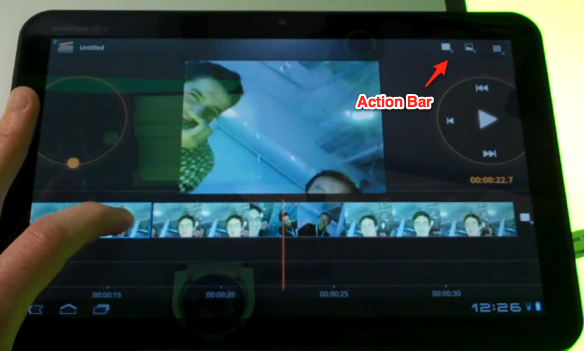
One of the most drastic changes is the move from dedicated hardware buttons to access Menu options to the ‘Action Bar’ — a UI element at the top of the screen with options that change depending on whatever application you’re using.
If you’re in the tablet’s browser (which is based on Google Chrome) then this is where you’ll find your open tabs. If you’re in the movie editing app, it’s where you’ll find buttons to import a new clip — but if you hold your finger down on a section of a clip then the Action Bar will populate with options to add a transition or text overlay. In other words, the Action Bar changes dynamically based on what you’re doing in an application.
Most applications also include a Settings button in the far righthand side of the Action Bar, though this is only a convention and not a rule.
In practice the system seems to work well, and you’ll find that you instinctively look toward the Action Bar whenever you want to find an application option or setting that isn’t part of the main UI. Of course, developers are in complete control over what appears in the Action Bar so there could be some consistency issues. But at least people will actually be able to find these options, which is more than can be said about the options hidden behind the ‘Menu’ button on current versions of Android (which many people never hit).
Browser
Kicks the pants off of the iPad’s browser. Tabs are great, and the fact that the tablet browser syncs with your desktop version of Google Chrome is very nice. Scrolling felt smooth. And there’s Incognito Mode.
Gmail
We’ve seen it showcased a few times now, but Gmail for Honeycomb is awesome — it’s like the iPad-optimized web version of Gmail, but without the slight lag you still find on browser apps. I want it badly.
Copy And Paste
I’ve never cared about copy & paste nearly as much as the people who spend their time complaining about its implementation on the web. But I know you’re out there, so here’s some good news: it’s works well on Honeycomb.
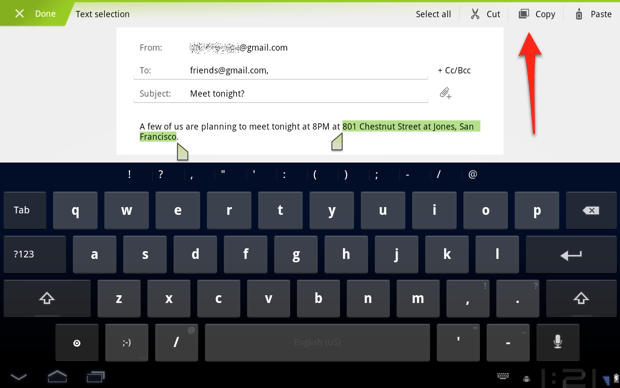
If you’ve used Android Gingerbread you’re already familiar with the orange arrows that appear when you go to highlight text. These work pretty well, but there’s one problem: there’s no button to choose what you want to dowith that text (the solution is to simply tap the highlighted text, which copies it to the clipboard, but some sort of menu overlay would be nice).
Things are much better in Honeycomb: when you highlight text, the Action Bar changes from its current options to let you Cut, Copy, Paste, or Select All. Is it exciting? Not at all. But it’s a good example of how the Action Bar changes depending on what you’re doing, and I’m sure some of you are going to be over the moon about this.
Android Market
The UI of Android Market has been revamped for the tablet. I think it’s pretty ugly: the ‘Android Green’ striped lines feel almost like placeholder graphics and it doesn’t look nearly as attractive as iOS’s App Store. But it gets the job done.

Movie Studio
It hasn’t gotten much press, but there’s a new application included as part of the Honeycomb suite of Google applications: Movie Studio. I didn’t spend too much time in this, but it includes the features you’d expect: transitions between clips, text overlays, and so on. The UI isn’t what you’d call pretty and it think it may leave some people scratching their heads, but it’s a nice app to have.

Source: Techcrunch
Hello world!
Posted by on February 3, 2011
Welcome to WordPress.com. This is your first post. Edit or delete it and start blogging!
 The Analyst Speaks
Recent Comments