The Analyst Speaks
Redefining the Social Media
Tag Archives: android
First Impressions: Android Honeycomb
Posted by on February 3, 2011
 This morning Google held an event to showcase Android Honeycomb, the new version of the mobile OS that is focused on tablets. There wasn’t much news around the OS — we’ve seen it previewed in a few demos — but the team did show off some of Honeycomb’s slickest features, like widgets and an improved 3D rendering engine.
But what about actually using the tablet OS? For all the whiz-bang previews we’ve seen, very few people have actually written about what it’s like to use these tablets. Unfortunately today’s event wasn’t the ideal place to do a full hands-on, either — there were dozens of reporters and only four tablets (most people got to play with one for maybe five minutes). But I wanted my fill of Honeycomb, so I stuck around til the crowd finally died down, put on my blinders, and took the Motorola Xoom for a 20+ minute spin. Apologies to the guy waiting behind me — I honestly didn’t realize you were there.
Here are some of the features and apps that stood out — be sure to check out the video below for some of these in action.
The Action Bar

One of the most drastic changes is the move from dedicated hardware buttons to access Menu options to the ‘Action Bar’ — a UI element at the top of the screen with options that change depending on whatever application you’re using.
If you’re in the tablet’s browser (which is based on Google Chrome) then this is where you’ll find your open tabs. If you’re in the movie editing app, it’s where you’ll find buttons to import a new clip — but if you hold your finger down on a section of a clip then the Action Bar will populate with options to add a transition or text overlay. In other words, the Action Bar changes dynamically based on what you’re doing in an application.
Most applications also include a Settings button in the far righthand side of the Action Bar, though this is only a convention and not a rule.
In practice the system seems to work well, and you’ll find that you instinctively look toward the Action Bar whenever you want to find an application option or setting that isn’t part of the main UI. Of course, developers are in complete control over what appears in the Action Bar so there could be some consistency issues. But at least people will actually be able to find these options, which is more than can be said about the options hidden behind the ‘Menu’ button on current versions of Android (which many people never hit).
Browser
Kicks the pants off of the iPad’s browser. Tabs are great, and the fact that the tablet browser syncs with your desktop version of Google Chrome is very nice. Scrolling felt smooth. And there’s Incognito Mode.
Gmail
We’ve seen it showcased a few times now, but Gmail for Honeycomb is awesome — it’s like the iPad-optimized web version of Gmail, but without the slight lag you still find on browser apps. I want it badly.
Copy And Paste
I’ve never cared about copy & paste nearly as much as the people who spend their time complaining about its implementation on the web. But I know you’re out there, so here’s some good news: it’s works well on Honeycomb.
If you’ve used Android Gingerbread you’re already familiar with the orange arrows that appear when you go to highlight text. These work pretty well, but there’s one problem: there’s no button to choose what you want to dowith that text (the solution is to simply tap the highlighted text, which copies it to the clipboard, but some sort of menu overlay would be nice).
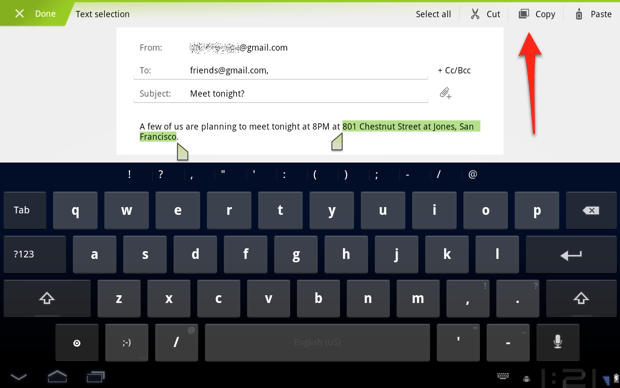
Things are much better in Honeycomb: when you highlight text, the Action Bar changes from its current options to let you Cut, Copy, Paste, or Select All. Is it exciting? Not at all. But it’s a good example of how the Action Bar changes depending on what you’re doing, and I’m sure some of you are going to be over the moon about this.
Android Market
The UI of Android Market has been revamped for the tablet. I think it’s pretty ugly: the ‘Android Green’ striped lines feel almost like placeholder graphics and it doesn’t look nearly as attractive as iOS’s App Store. But it gets the job done.

Movie Studio
It hasn’t gotten much press, but there’s a new application included as part of the Honeycomb suite of Google applications: Movie Studio. I didn’t spend too much time in this, but it includes the features you’d expect: transitions between clips, text overlays, and so on. The UI isn’t what you’d call pretty and it think it may leave some people scratching their heads, but it’s a nice app to have.

Source: Techcrunch
 The Analyst Speaks
Recent Comments